

The Best AI Tools for Interior Designers in 2026 (What's New, What's Worth It)
A year ago, the conversation about AI in interior design was still largely theoretical for most practitioners. Could it help? Was it worth the time to learn? Would it produce anything actually usable?
In 2026, that conversation is over. AI tools have become a genuine part of professional interior design workflows — not replacing the designer's eye or judgment, but removing enormous amounts of friction from the parts of the process that don't require it. Faster concept visualisations. Mood boards in minutes. Client renders that used to take days.
The challenge now isn't whether to use AI — it's knowing which tools are actually worth your time, which are genuinely built for professional designers rather than homeowners, and how to integrate them without your workflow becoming a patchwork of half-used subscriptions.
This is an honest assessment of what's worth using in 2026 — broken down by what you're actually trying to do.

The question in 2026 isn't whether to use AI. It's knowing which tools solve real problems in your workflow — and which just look impressive in a demo.
How to Think About AI Tools as a Designer
Before the tool reviews, a framing that will help you evaluate everything that follows: the best AI tools for designers are the ones that remove time from tasks that don't require your expertise, so you have more of it for the tasks that do.
Generating five visualisation options for a client to react to? AI does that in minutes instead of hours. The spatial thinking, the material selection rationale, the understanding of how a family actually uses a kitchen — that's still yours.
The designers getting the most value from AI in 2026 aren't using it to replace their process. They're using it at specific moments in the process to move faster and present more confidently.
🎨 VISUALISATION & RENDERING
This is where AI has had the most dramatic impact on design workflows. Tools that can take a room photo or sketch and generate photorealistic concepts in seconds have compressed what used to be a multi-day render process into a conversation-length task.
Midjourney · AI Image Generation
Best for: Concept mood generation, style exploration, aspirational imagery
Midjourney remains the gold standard for generating beautiful, concept-level interior imagery from text prompts. It excels at producing atmospheric, high-quality visuals that communicate a design direction — particularly in early-stage concept work. Version 6 brought significant improvements to architectural coherence and material realism. It won't respect the geometry of an actual room, but for establishing a visual language or presenting a direction to a client before the technical work begins, it's unmatched.
Worth knowing: It generates impressionistic rather than precise images — not suitable for technical specification or spatial accuracy. Requires prompt skill to get consistent results.
Pricing: Basic plan from $10/month. Standard $30/month. Pro $60/month.
Verdict:Essential for concept-stage visualisation. Every designer should know how to prompt it effectively.
InteriorAI · Room Redesign & Virtual StagingBest for: Transforming existing room photos into redesigned concepts across multiple styles
InteriorAI takes a photo of an existing space and generates redesigned versions across 40+ interior styles with impressive realism. It preserves the room's actual geometry and proportions — unlike pure text-to-image tools — making the output genuinely useful for client presentations. Its virtual staging capability is particularly strong for property professionals. The 3D VR walkthrough feature on higher tiers is worth exploring for client presentations.
Worth knowing: Style results can be inconsistent across complex rooms with unusual proportions. The free tier is limited — professional use requires a paid plan.
Pricing: Pro from $49/month. Premium $99/month. Ultra $199/month.
Verdict:Strong choice for client-facing redesign visualisations. Best when you have an actual room photo to work from.
Rendair AI · Professional Rendering
Best for: Designers who need precise, controllable renders from sketches or 3D block-outs
Rendair is positioned for the professional end of the market — it interprets rough sketches and 3D models and generates photorealistic renders while preserving structural geometry. Its inpainting feature lets you swap specific elements (furniture, materials) without regenerating the whole scene, which is a significant workflow advantage. Built specifically for architects and interior designers rather than homeowners.
Worth knowing: Higher learning curve than consumer tools. Best results require clean input files.
Pricing: Subscription-based — check website for current plans.
Verdict:The most professionally controlled rendering option for designers who need output they can actually use in client deliverables.
SketchUp Diffusion · AI Rendering for SketchUp
Best for: SketchUp users who want instant renders from existing 3D models
If you're already working in SketchUp, Diffusion is a native extension that turns your models into photorealistic renders in under 20 seconds. Describe the scene in words, select a style preset, and adjust the geometry adherence and prompt influence sliders. The tight integration with SketchUp's existing workflow is its biggest advantage — no file exporting, no third-party upload.
Worth knowing: Only useful if SketchUp is already in your workflow. Results are good but not as precise as dedicated render tools.
Pricing: Included with SketchUp subscriptions at higher tiers.
Verdict:If you're a SketchUp user, try this before subscribing to any standalone render tool.
🎭 MOOD BOARDING & CONCEPT DEVELOPMENT
The mood board process has been transformed by AI — not by replacing the curation process, but by dramatically accelerating image generation, style exploration, and layout assembly.
Morpholio Board · Professional Mood Boarding
Best for: Designers who want a purpose-built mood board tool with AI-assisted product sourcing
Morpholio Board is the most professional mood boarding tool in the market and has steadily added AI capabilities. Its AI shopping feature surfaces real products from brands like Restoration Hardware, CB2, and Farrow & Ball based on what you've added to the board. The board assembly, annotation, and presentation features are the best in class for professional use. Used by 2 million designers globally.
Worth knowing: Free tier is limited for professional output. Full AI shopping and export features require a paid plan.
Pricing: Free basic use. Paid plans for professional tools and exports.
Verdict:The standard for professional digital mood boarding. The AI product sourcing alone makes it worth the subscription.
ChatGPT / Claude · AI Writing & ResearchBest for: Writing client-facing copy, generating brief summaries, research, proposal drafting
General-purpose AI assistants have become genuinely useful in design practice — not for generating images, but for the writing-heavy parts of the workflow. Brief summaries, project descriptions, specification notes, client email drafting, sourcing research, and presentation copy all move significantly faster with an AI writing assistant. The key is learning to prompt specifically for design contexts.
Worth knowing: Requires good prompting to get design-specific outputs. Won't replace your professional judgment on specification or design decisions.
Pricing: Free tiers available. Paid plans from approximately $20/month.
Verdict:Underused by most designers. The ROI on time saved for writing and research tasks is high from day one.
📐 SPACE PLANNING & FLOOR PLAN TOOLS
AI-assisted space planning tools have matured significantly. The most useful developments are in floor plan recognition from photos and AI-assisted layout optimisation.
Planner 5D · AI Space Planning
Best for: Quick 3D space planning and client-facing layout visualisation
Planner 5D's AI floor plan recognition is one of its most compelling features for professional use — upload a photo of an existing floor plan and it automatically converts it to an interactive 3D model. Combined with a library of 8,000+ furniture items at real dimensions, it's a strong tool for rapid layout exploration and client-facing 3D walkthroughs. The AI Designer feature generates layout suggestions from a room description.
Worth knowing: Not a replacement for AutoCAD precision. Better suited to early-stage layout exploration than construction documentation.
Pricing: Premium $4.99/month. Professional $33.33/month.
Verdict:Strong for client-facing layout presentations. Pair with AutoCAD for technical documentation.
MyArchitectAI · CAD RenderingBest for: Designers who want photorealistic renders directly from CAD or SketchUp files
MyArchitectAI specialises in converting CAD designs and SketchUp models into photorealistic renders in under 10 seconds. It reads the geometry of your model accurately and handles lighting and texturing automatically. The 'edit' function lets you describe changes in plain language — 'change the kitchen island to marble' — and rerenders accordingly. Browser-based with no install required.
Worth knowing: Render quality varies depending on input model complexity. Best results from clean 3D models rather than 2D drawings.
Pricing: Subscription-based — check website for current pricing.
Verdict:One of the fastest routes from CAD model to client-ready render. Worth testing if you use SketchUp or produce 3D block-outs.
How These Tools Fit Into a Real Design Workflow
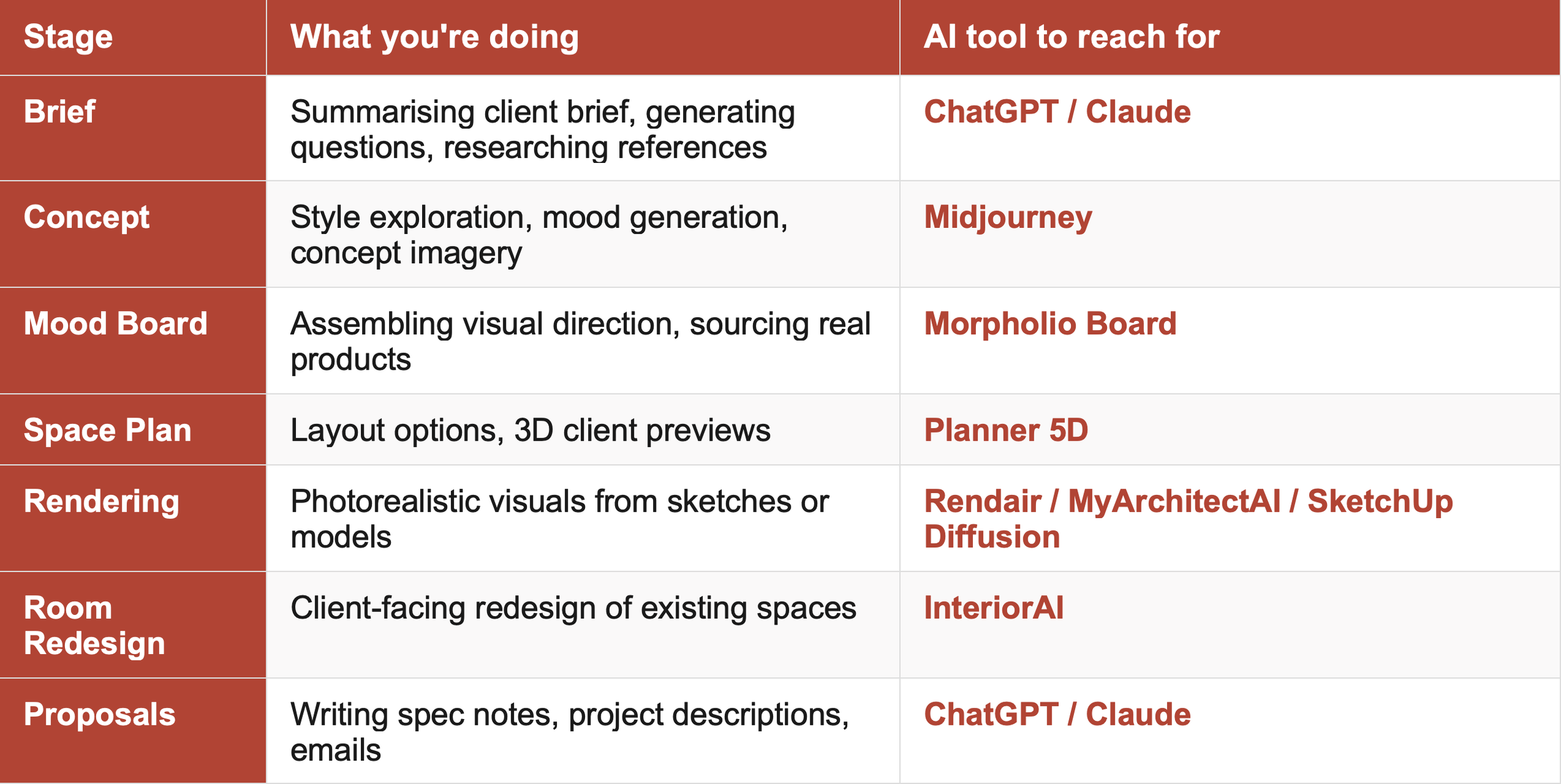
Here's a practical map of where each tool category adds the most value across the design process — so you can see at a glance what to reach for at each stage.
Building Your AI Stack: Start Small
The temptation when surveying this landscape is to subscribe to everything and figure out where it fits later. The designers using AI most effectively in 2026 tend to have a small, intentional stack — two or three tools they know well — rather than a sprawl of subscriptions they use occasionally.
A practical starting point for most professional interior designers:
Midjourney — for concept imagery and style exploration at the brief and concept stage
Morpholio Board — for professional mood boarding with AI product sourcing
One rendering tool — Rendair, MyArchitectAI, or SketchUp Diffusion depending on your existing workflow
ChatGPT or Claude — for the writing-heavy parts of the workflow
That's four tools covering the four highest-friction areas of a design workflow. Test the free tiers of each before committing. Add more only when you've got real value from what you already have.
The designers who use AI well don't use more tools than everyone else. They use fewer tools — and they know them deeply.
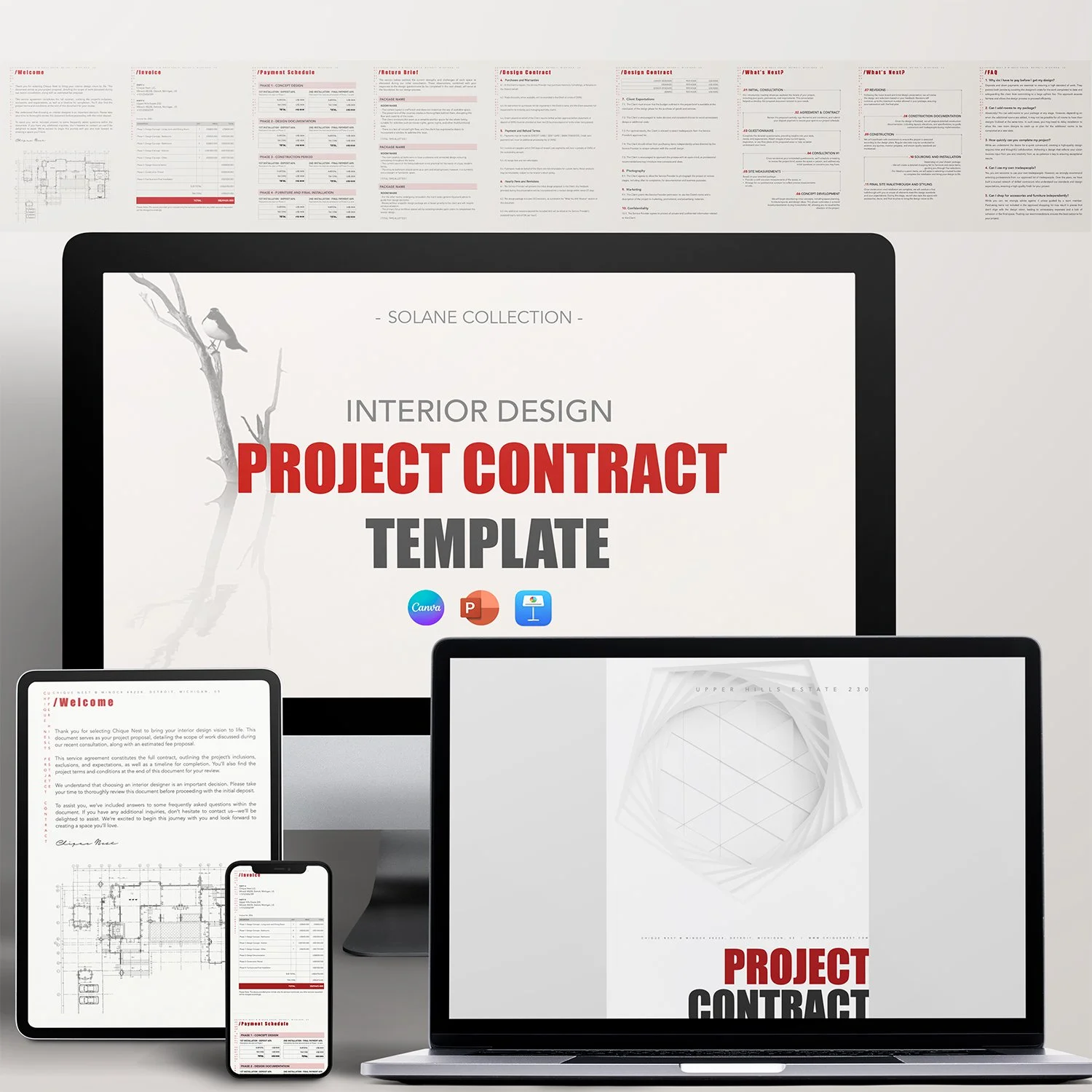
AI tools generate visuals faster — but the design thinking underneath them still needs to be yours. Chique Nest's AutoCAD blocks, presentation templates, and business tools give you the professional foundation that AI enhances rather than replaces.

Stop sending clients a plain PDF and hoping it lands. The Chique Nest Project Proposal Template gives you a beautifully laid-out proposal that shares your inspiration, goals, requirements, mood board, and timeline — everything a client needs to say yes.
Tells the Full Design Story: From inspiration and design goals through to project requirements and mood board, clients see your thinking, not just your pricing.
Fully Customizable: Easily tailor fonts, colors, images, and layouts in Canva, PowerPoint, or Keynote to reflect your brand's unique identity.
Visual Project Timeline: A clean 5-phase timeline graphic so clients know exactly what to expect and when.
Past Work Built In: Dedicated "Our Works" pages with room to showcase real projects and client testimonials.
Save Time and Effort: Stop rebuilding a proposal deck from scratch for every new lead — just update the project details.
—— 📨 What’s Included in the download?
You’ll receive:
✅ 5 Files Total
• PDF with Download Link + Instruction Manual
• 1 Keynote Template
• 1 PowerPoint Template
• 1 Canva Template
• 1 PDF Example File by Chique Nest
✅ 17 Fully Editable Pages
—— 🖌️ What’s inside the template?
This comprehensive project proposal includes every section you need to pitch and win a new project:
✔️ Welcome
✔️ Finding Inspiration
✔️ Design Goals
✔️ Project Requirements
✔️ Mood Board
✔️ Project Timeline
✔️ Terms
✔️ Design Process
✔️ Next Steps
✔️ Our Works
✔️ Meet Our Team
✔️ Contact Us
—— 📂 File Format & Compatibility:
Available in Widescreen (16:9) format, this template is compatible with:
✔️ Canva (requires a free Canva account)
✔️ PowerPoint
✔️ Keynote
All elements are fully customizable, including fonts, text, images, and branding.