

AutoCAD vs. Other Design Software: Which Tool Is Right for Interior Designers?
Walk into any interior design studio and ask what software they use — you'll get a different answer every time. AutoCAD. SketchUp. Revit. Rhino. And increasingly, the newer generation of browser-based tools like Planner 5D or Roomstyler.
Each has its advocates. Each has its critics. And if you're trying to decide where to invest your time and money, the noise can be genuinely overwhelming.
This guide cuts through all of it. We're looking at the most widely used design tools for interior designers, what each one actually does well, where each one falls short — and helping you figure out which combination makes sense for the type of work you do.

There's no single 'best' software for every designer. The right answer depends on your project type, your clients, your team, and how you work. Let's find yours.
First: Why Software Choice Actually Matters
It's tempting to treat software as a background detail — something you pick once and never think about again. But your software stack has a direct impact on:
How long it takes you to produce drawings and presentations
The quality and professionalism of what you deliver to clients
How easily you can collaborate with architects, contractors, and other consultants
Your ability to take on certain types of projects at all
The cost of running your business month to month
Choosing the wrong tool — or using the right tool for the wrong job — creates friction at every stage of a project. Getting this right is a business decision as much as a creative one.
Find the Best AutoCAD Blocks Library for your projects
AutoCAD: The Industry Standard for Technical Drawing
AutoCAD has been the backbone of architectural and interior design technical drawing for decades. It's precise, powerful, and speaks a language that architects, contractors, and engineers all understand.
What AutoCAD Does Best
2D technical drawing — floor plans, elevations, sections, construction details
Absolute dimensional precision — critical for space planning and construction documentation
Industry-standard file format (.DWG) — opens anywhere, shared by everyone
Layer management for complex, multi-discipline drawings
Reusable block libraries that dramatically speed up drafting
Printing and plotting for professional drawing sets
Where AutoCAD Has Limitations
No native 3D visualisation or rendering for client presentations
Steep learning curve compared to consumer-facing tools
Subscription cost — Autodesk pricing is significant for solo designers
Not designed for mood boards, concept presentations, or visual storytelling
💡 Who AutoCAD Is For
AutoCAD is non-negotiable if you're producing technical drawings for construction, working alongside architects, or delivering professional space plans. It's the language of the building industry — and fluency in it sets you apart from designers who can only work at concept level.
SketchUp: The Go-To for 3D Space Modeling
SketchUp is arguably the most widely used 3D modelling tool among interior designers, and for good reason. It's relatively intuitive, visually immediate, and produces the kind of 3D walkthroughs clients actually respond to.
What SketchUp Does Best
Fast, intuitive 3D modeling — you can build a room in hours, not days
Excellent for client-facing 3D presentations and walkthroughs
Large library of pre-built furniture and objects via the 3D Warehouse
Good rendering with plugins like V-Ray or Enscape
Accessible enough for junior designers or design students to learn quickly
Where SketchUp Has Limitations
Not a technical drawing tool — not suitable for construction documentation
Dimensional accuracy can be compromised if not used carefully
Complex organic forms are difficult to model cleanly
Relies heavily on plugins for professional-grade rendering
SketchUp and AutoCAD are not competitors — they're complements. Many professional designers use AutoCAD for technical drawings and SketchUp for 3D client presentations on the same project.
Revit: The BIM Powerhouse
Revit is Autodesk's Building Information Modelling (BIM) platform — and it's increasingly becoming a requirement for commercial and high-end residential projects where full BIM coordination is expected.
What Revit Does Best
Full BIM workflow — every element is data-rich and interconnected
Changes update automatically across all views (floor plan, elevation, section, 3D)
Industry standard for large commercial, hospitality, and institutional projects
Excellent for coordinating with architects and structural engineers on complex builds
Detailed scheduling — doors, windows, finishes, furniture can all be tagged and scheduled
Where Revit Has Limitations
Very steep learning curve — it takes months to become genuinely proficient
Heavy on hardware — requires a powerful computer to run smoothly
Overkill for residential or smaller commercial interior design projects
Expensive, and most value comes only when the whole project team is on Revit
💡 Who Revit Is For
Revit is most relevant for interior designers working in commercial, hospitality, or large-scale residential sectors where full BIM coordination is required. For independent residential designers, it's rarely the right investment of time or money.


Rhino: The Choice for Custom and High-End Design
Rhinoceros (Rhino) is a NURBS-based 3D modelling tool beloved by designers working with complex geometry, custom joinery, bespoke furniture, or highly parametric design.
What Rhino Does Best
Complex, freeform 3D geometry that SketchUp can't handle cleanly
Extremely precise — suitable for custom manufacturing and fabrication
Grasshopper plugin enables parametric and generative design
Used in high-end residential, luxury retail, and hospitality sectors
Where Rhino Has Limitations
Significant learning investment — not a beginner tool
Primarily a modeling tool; rendering and documentation require additional software
Less relevant for standard residential interior design projects
Browser-Based & Consumer Tools: Fast, Visual, Limited
Tools like Planner 5D, Roomstyler, Homestyler, and even Canva for mood boards have grown in popularity — especially among designers just starting out or working with budget-conscious clients.
What These Tools Do Well
Extremely low barrier to entry — little to no training required
Good for quick concept visuals and client-facing mood presentations
Often free or low-cost
Accessible on any device, no installation required
Where They Fall Short
Not suitable for professional technical documentation
Dimensional accuracy is unreliable for construction purposes
Cannot produce drawings that meet industry or regulatory standards
Limited customisation — you're constrained to the tool's built-in assets
Consumer tools have a place in early-stage client communication — quick mood boards, rough layout concepts, initial visualisations. But they should never be your primary production tool if you're running a serious design business.
Quick Comparison: Software at a Glance
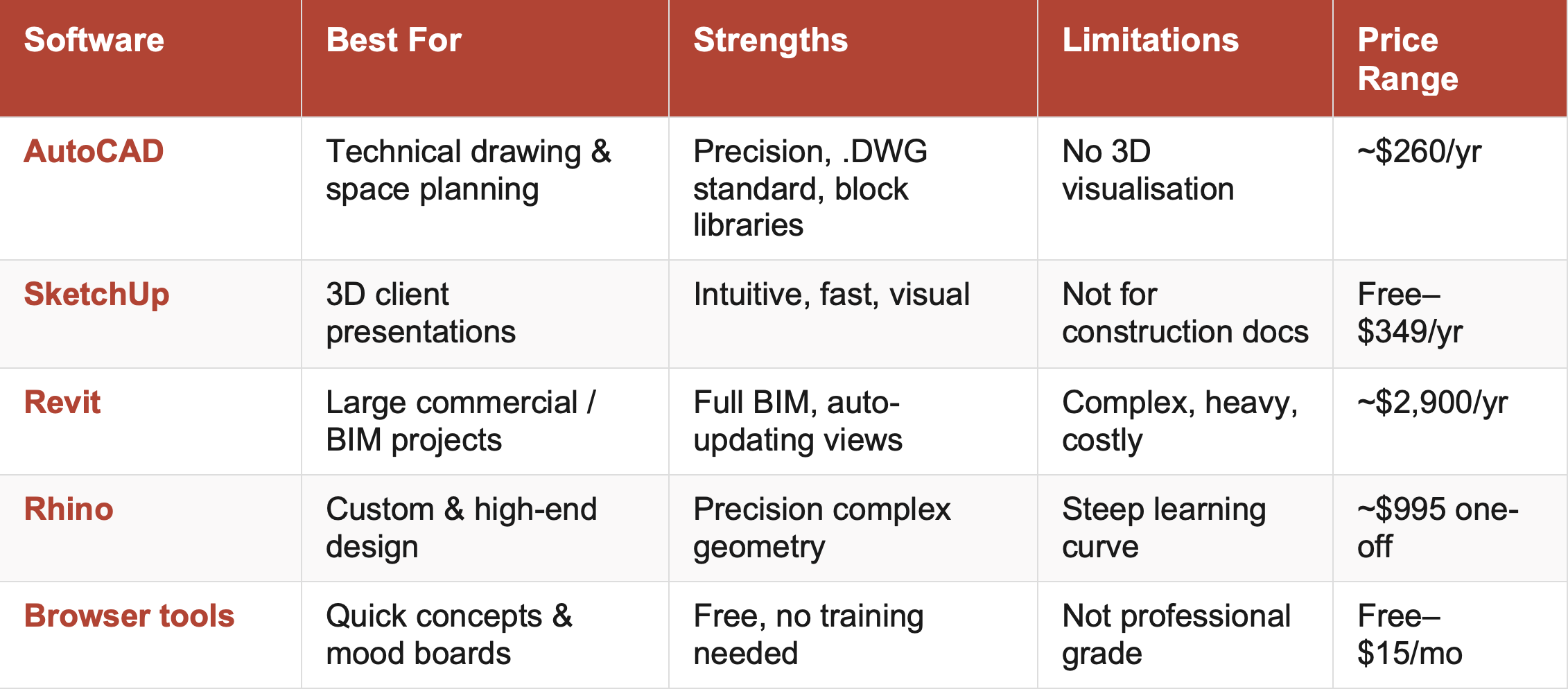
* Pricing approximate as of 2026. Always check the provider's website for current rates.
So Which Tools Should You Actually Use?
The answer depends on what kind of designer you are and what kind of work you do. Here's a practical breakdown:
If you're a residential interior designer:
AutoCAD for all technical drawings, space plans, and client documentation
SketchUp for 3D concept models and client presentations
Canva or Adobe for mood boards and design proposals
If you're working in commercial or hospitality design:
AutoCAD or Revit depending on project scale and team requirements
SketchUp or Rhino for 3D visualisation and custom elements
Adobe Creative Suite for marketing, presentations, and branding
If you're just starting out:
Start with AutoCAD — it's the most transferable, most in-demand skill
Add SketchUp once you're comfortable with 2D workflows
Avoid getting distracted by every new tool that launches — depth beats breadth
🎯 The Core Principle
Master AutoCAD first. Every other tool is a layer on top. Precision technical drawing is the foundation of a professional interior design practice — and AutoCAD is where that foundation is built.
Bottom Line
There's no single software that does everything. The most effective designers don't choose one tool — they build a small, focused stack where each tool does what it's best at.
AutoCAD for precision. SketchUp for 3D. Adobe or Canva for presentation. That combination covers the vast majority of what a professional interior designer needs to deliver, at every stage of a project.
Pick your stack deliberately. Learn each tool properly. And remember — the best software is the one you actually know how to use well.
Clients don't care what software you use. They care about what you produce. Invest in the tools that help you produce your best work, faster.


Chique Nest's AutoCAD Block Libraries are built specifically for interior designers — professionally drawn, fully layered, and ready to drop straight into your drawings. Stop drawing from scratch on every project.

500+ Detailed Kitchen Blocks — Design with Precision and Speed
🔧__ Design Kitchens Like a Pro
This expertly crafted kitchen AutoCAD library gives you all the tools to design complete kitchen layouts with ease. Whether you’re working on cabinetry plans, sections, or isometric visualizations, these blocks help you present polished, professional designs — without the hassle.
Ideal for interior designers, architects, and kitchen specialists who need precision, speed, and accuracy in every project.
✅__ What You’ll Get:
✔️ 500+ kitchen-specific AutoCAD blocks
✔️ Includes:
Kitchen elevations
Kitchen sections
Kitchen floorplans
Kitchen ISO (isometric) models
Detailed kitchen items and fittings
📂__ File Format & Compatibility:
Provided in .dwg format
Fully compatible with AutoCAD 2013 and newer
Works on both Windows and Mac systems
Created in metric units — also fully usable in imperial projects with the correct import settings
⚡__ Instant Access. One-Time Purchase. Use Forever.
✔️ Instant digital download upon purchase
✔️ No recurring fees — one-time payment for lifetime use
✔️ All sales are final (due to the digital nature of the product)
❗ This is not an AutoCAD course — blocks only
🚀__ Why Buy Now?
From floorplans to elevations to ISO models — this library is your all-in-one solution for kitchen CAD drawings.
Save time, increase accuracy, and impress clients with fully coordinated, ready-to-drop kitchen blocks.
🎯 Ready to elevate your kitchen design workflow? Add this premium collection to your CAD toolkit now.