

For a long time, interior designers used Instagram the same way they used a portfolio — beautiful finished room shots, curated and polished, showing the best of the best. And it worked. For a while.
Then Reels arrived. And the designers who adapted their approach didn't just get more views — they started getting better clients. Clients who already understood how the process worked, who were pre-sold on the designer's approach, and who arrived at the enquiry call saying 'I've been following you for months, I know exactly what I want.'
That's the shift this guide is about. Not just how to make Reels — but how to use them to attract the kind of clients who are genuinely excited to work with you.

A portfolio shows what you've done. Reels show how you think. And clients hire both.
Why Reels Work Differently to Static Posts
Instagram's algorithm is not subtle about its preferences: it pushes Reels. Hard. A Reel from a designer with 3,000 followers can reach 50,000 people. The same content as a static post might reach 300. That's not a small difference — it's a different category of visibility entirely.
But beyond the algorithm, Reels do something static posts can't: they show personality, voice, and process in motion. A potential client watching a 45-second Reel of you walking through a mood board, explaining your spatial thinking, reacting to a site visit — they're getting to know you in a way a grid of beautiful images never achieves.
By the time they enquire, they've already made most of their decision. You're not a stranger they're evaluating — you're someone they feel they already know.
The best marketing doesn't feel like marketing. A Reel that teaches, entertains, or shows something genuinely interesting isn't an ad — it's a relationship being built in 45 seconds at a time.
FIND THE RIGHT TEMPLATES FOR YOUR INTERIOR DESIGN PROJECTS
Your Design Process Is Your Best Content
One of the most common questions designers ask is: 'But what do I actually film?' The answer is almost always sitting right in front of them — their own work, as it happens. Every stage of the design process is content that potential clients find fascinating, because it's a world they don't have access to.





7 Reel Formats That Convert — Not Just Entertain
Not all Reels are created equal. Viral content that attracts followers who will never hire you is a vanity metric. These formats are built to attract the right audience — people planning a project, thinking about design, looking for someone they can trust.
1 — The Process Reveal
Hook: "Watch what happened to this dark, cramped kitchen over 8 weeks."
Structure: Compressed time-lapse or fast-cut sequence from brief to reveal. Voice-over or text overlays explaining decisions at each stage. Finish on the hero shot.
Conversion angle:The full journey builds emotional investment. By the reveal, viewers are rooting for the outcome — and imagining their own home.
2 — The Decision Walkthrough
Hook: "Why I chose marble over quartz for this kitchen — and why it was the right call."
Structure: Hold the material, talk to camera. Explain the decision — practical, aesthetic, budget. Be honest about trade-offs.
Conversion angle:Demonstrates the depth of thought behind choices clients assume are made by feel. Builds confidence in your expertise.
3 — The Common Mistake
Hook: "The sofa placement mistake I see in almost every living room I visit."
Structure: Talk to camera or voiceover over footage. One mistake, clearly explained, with the fix shown. Keep it to 30–45 seconds.
Conversion angle:Highly shareable — people tag the person who makes that exact mistake. Positions you as an authority without feeling like a lecture.
4 — The Style Breakdown
Hook: "This is how we created a cohesive look across four completely different rooms."
Structure: Cut between rooms with on-screen text identifying the connecting thread — material, colour, texture, proportion. Quick-paced, music-led.
Conversion angle:Appeals to aspirational viewers who want to understand the 'why' behind design coherence. High save rate.
5 — The Sourcing Secret
Hook: "Three suppliers I use on almost every project that most designers don't know about."
Structure: Hold products, show them installed, link to showroom if relevant. Honest opinions — what's great, what the limitations are.
Conversion angle:Attracts both potential clients who value insider knowledge and fellow designers who will share it. Builds authority in the trade.
6 — The Brief to Reality
Hook: "The client said 'cosy and modern'. Here's how we translated that into an actual design."
Structure: Show the initial brief or mood board, then cut to the finished space. Narrate the design decisions that bridged the two.
Conversion angle:Directly demonstrates the value you bring. Clients who struggle to articulate what they want will see themselves in this.
7 — The Talking Head
Hook: "Three things I always tell new clients before we start a project."
Structure: To camera, minimal editing, genuine. Your face, your voice, your perspective. No fancy setup needed.
Conversion angle:The highest-trust format on Instagram. Followers who watch talking head videos regularly feel they personally know the creator — and hire people they feel they know.
Writing Captions That Do Real Work
Most designers treat the Reel caption as an afterthought — a quick description of what's in the video. That's a missed opportunity. The caption is where you convert a viewer into a follower, a follower into an enquiry, and an enquiry into a client.
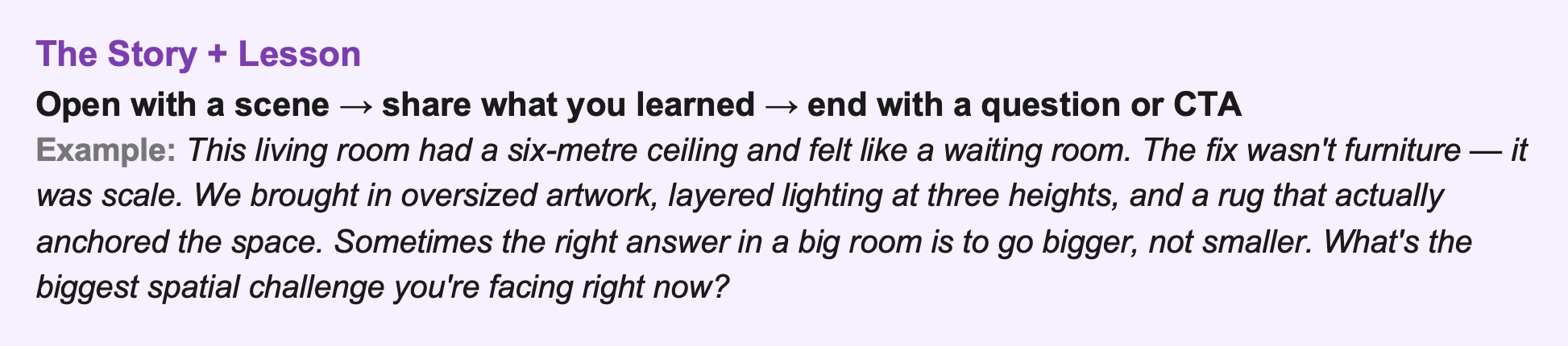
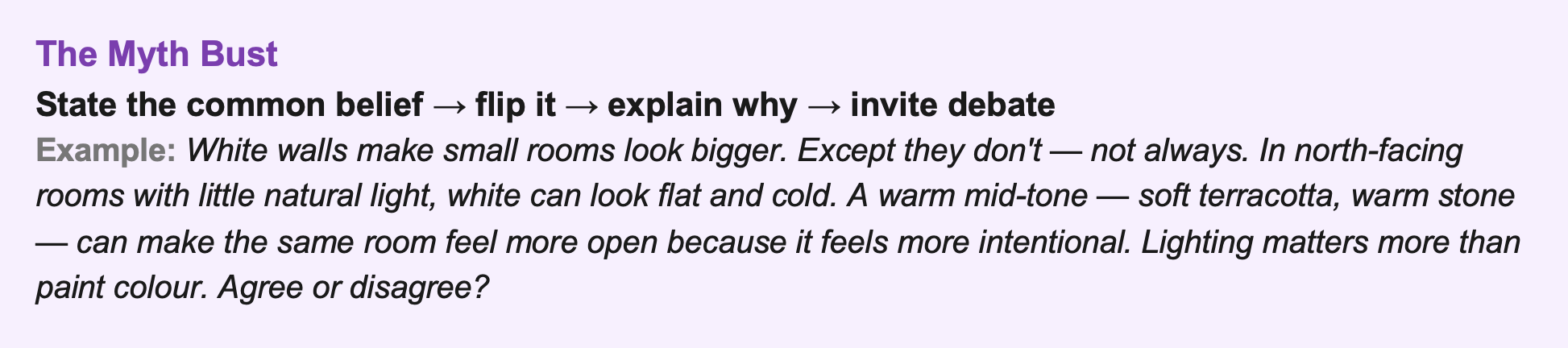
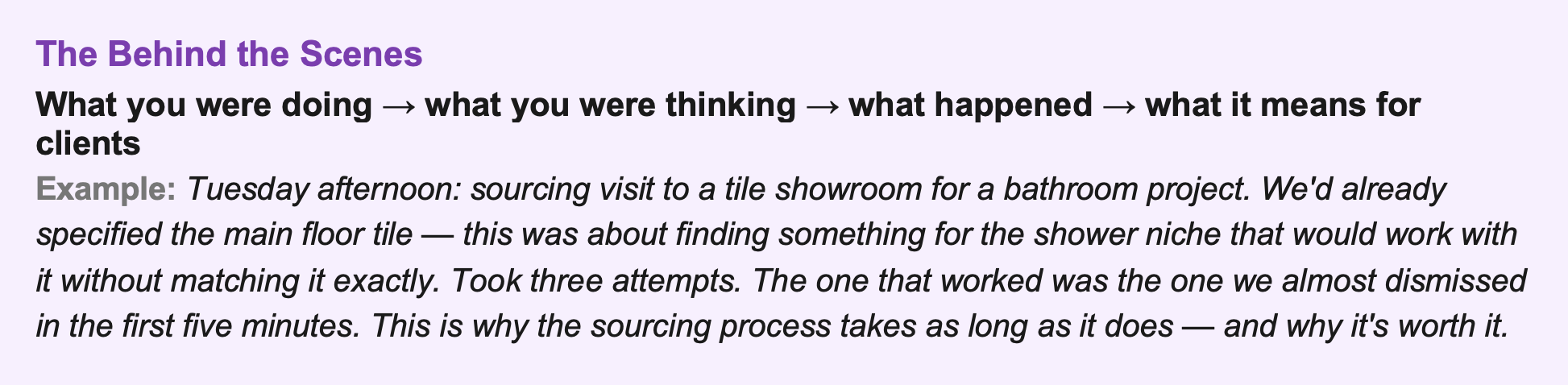
📌 End Every Caption With One of These
A question that invites a response ('What would you have chosen?'), a direct CTA ('Link in bio to see the full project'), or a save prompt ('Save this if you're planning a renovation'). Captions without a clear next step are just words. One prompt at the end changes the engagement entirely.
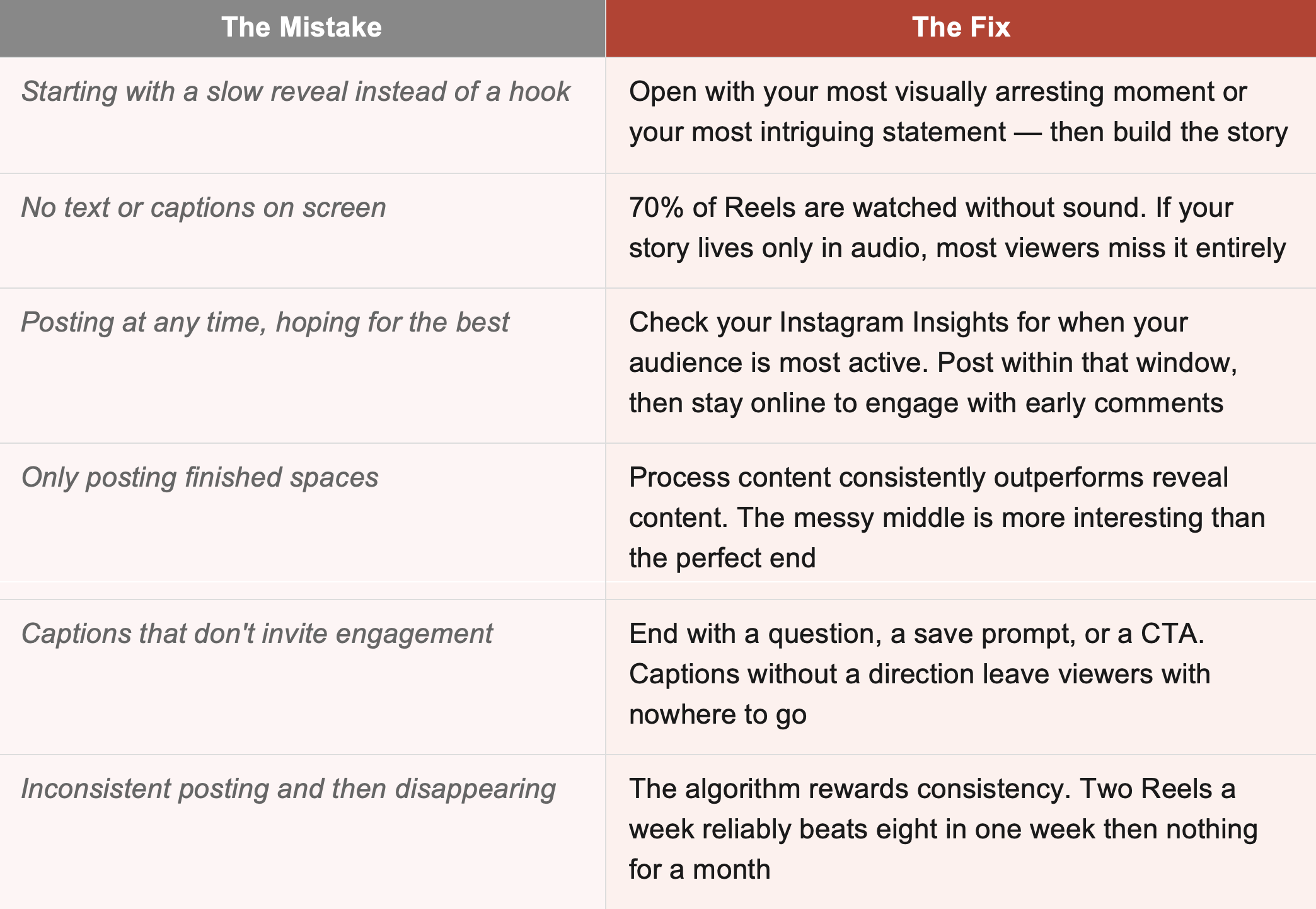
The Mistakes That Kill Reel Performance
From Viewer to Enquiry: Closing the Loop
Reels build awareness and warm audiences up. But the conversion — the moment a viewer becomes a paying client — usually happens somewhere else. Here's how to make sure your Reels are feeding into a system that actually converts.
Your profile is the landing page
When someone sees a Reel they love, the first thing they do is visit your profile. Your bio needs to tell them in three seconds who you are, who you work with, and what to do next. 'Interior designer for residential projects in London. DM to enquire.' is enough. A link to your website or a booking page seals it.
Use stories to deepen the relationship
Reels attract new people. Stories keep them. After posting a Reel, use Stories to go deeper — share what happened off-camera, answer questions that come in, show the follow-up to a project you teased. People who watch your Stories regularly are your warmest leads. They're one DM away from becoming clients.
Make the enquiry frictionless
If someone wants to talk to you after watching a Reel, they should be able to do it in two taps. A direct DM invitation in the caption or on-screen text, a link in bio that goes straight to a contact form, or simply being responsive to DMs — remove every barrier between interest and conversation.
Your Reels don't close the sale. They open the door. Make sure the door leads somewhere
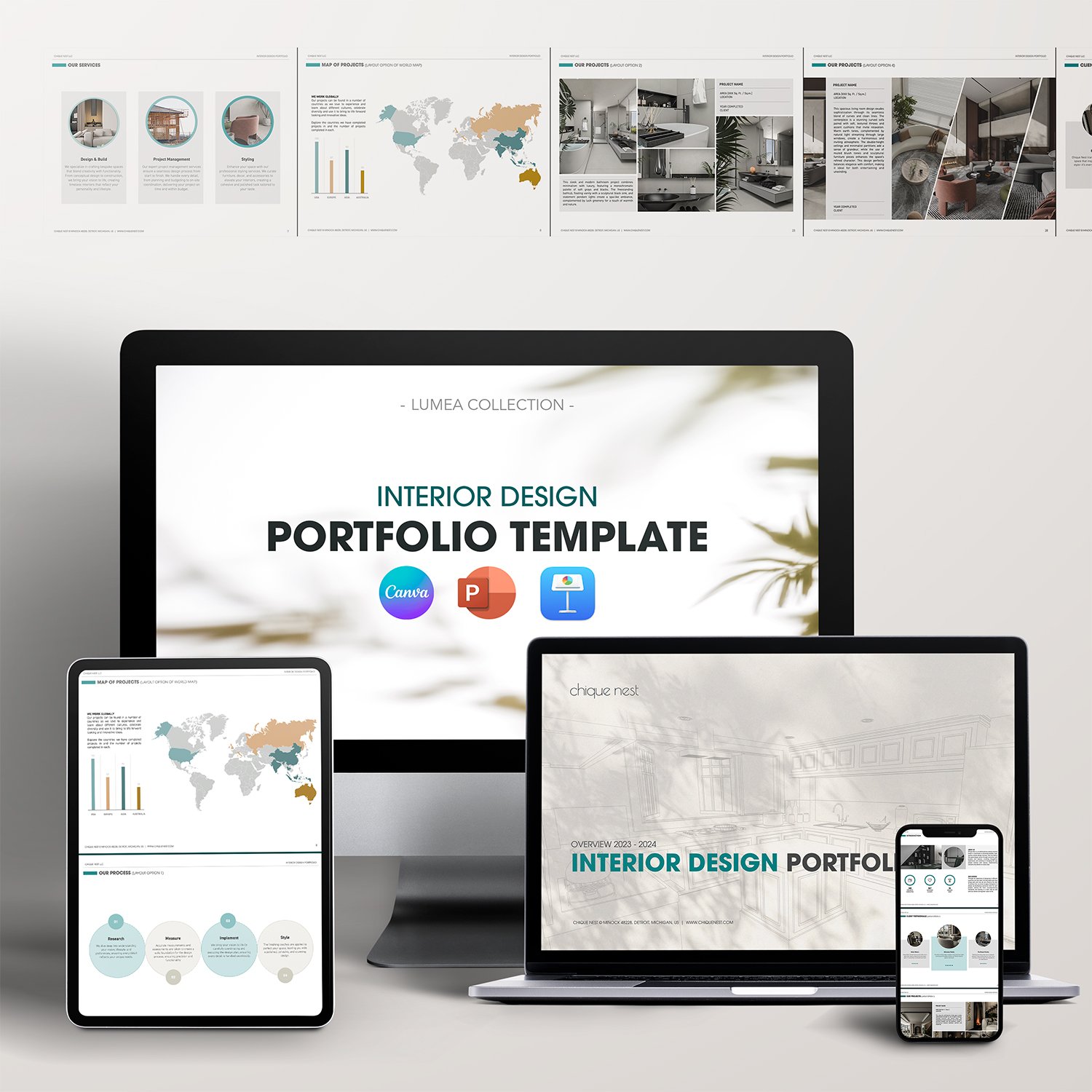
The best email lead magnets are genuinely useful — a design checklist, a room planning guide, a sourcing resource. Chique Nest's templates and tools give you professional content to offer as incentives that turn casual visitors into subscribers, and subscribers into clients.

Simplify your client onboarding process and clearly showcase your offerings with The Lumea Collection Packages & Pricing Template. Designed specifically for interior designers, this template provides a polished and professional way to present your services, pricing, and packages, helping you stand out and build trust with prospective clients.
Clearly Communicate Your Services: Highlight your package options, e-packages, and pricing details in a clean and organized format.
Fully Customizable: Easily tailor fonts, colors, images, and layouts in Canva, PowerPoint, or Keynote to reflect your brand’s unique identity.
Comprehensive and Client-Focused: Cover every detail, from client testimonials to package comparisons, ensuring transparency and building confidence.
Save Time and Effort: With thoughtfully designed layouts and pre-written content, you can quickly create stunning presentations that make a lasting impression.
Professional Presentation: Showcase your expertise and build trust by providing a clear and visually appealing document that simplifies decision-making for your clients.
—— 📨 What’s Included in the download?
You’ll receive:
✅ 12 Files Total
• PDF with Download Link + Instruction Manual
• 4 Keynote Files
• 4 PowerPoint Files
• 2 Canva Templates
• 1 PDF File
✅ 16 Fully Editable Pages in Two Beautiful Themes:
1. Golden Elegance
2. Turquoise Modern
—— 🖌️ What’s inside the template?
This comprehensive packages and pricing template includes all the sections you need to professionally present your interior design business:
✔️ Welcome
✔️ About Us
✔️ Client Testimonials
✔️ Our Team
✔️ What’s Next?
✔️ What to Expect
✔️ Packages Options
✔️ E-Packages Options
✔️ Packages Comparison
✔️ E-Packages Comparison
✔️ Questions & Answers
✔️ Contact Us
—— 📂 File Format & Compatibility:
Available in both Standard (4:3) and Widescreen (16:9) formats, this template is compatible with:
✔️ Canva (requires a free Canva account)
✔️ PowerPoint
✔️ Keynote
All elements are fully customizable, including fonts, text, images, and branding.